Veridelta
Veridelta compares two datasets on their primary keys and reports every row that differs under the rules you declare. Nothing is forgiven unless a rule says so, and the exit code tells CI whether the datasets match. Use it to verify a migration, a pipeline change, or a model's new evaluation run, on a laptop, in CI, or inside a warehouse.
Files, lakehouse tables, databases, and DuckDB files are read and compared on Polars. Two tables in one warehouse are compared inside it, as are two Postgres or DuckDB tables that set pushdown. Only counts and keys come back, unless pushdown_sample_rows asks for a sample of the changed rows.
Status
Veridelta is in alpha, so a minor version can still change the configuration or the Python API. Its tests run on generated data, including a suite that seeds known drift into two datasets and checks that each run reports exactly that drift, in a local run and in pushdown. Nobody but its maintainer is known to have run it yet. Its pushdown SQL has run in DuckDB and Postgres 16, but not yet in a live cloud warehouse, as Pushdown says.
Install
uv add veridelta                # or: pip install veridelta
uv add 'veridelta[snowflake]'   # extras: snowflake, databricks, bigquery, delta, iceberg, database, duckdb, excel, fuzzy, mcp, all
Quick start
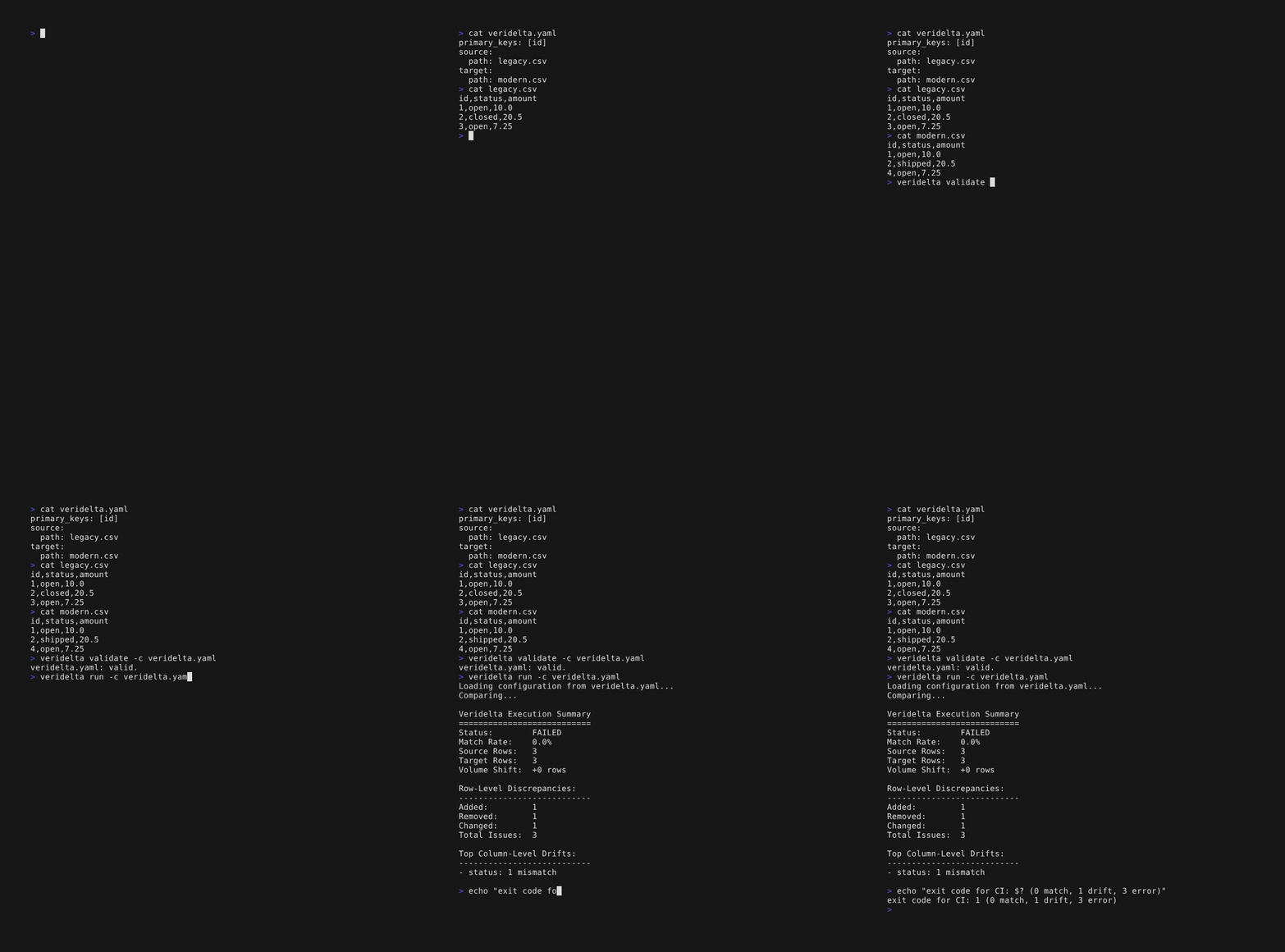
The smallest configuration names the two files and the keys that pair their rows. The suffix of each path says what format it is, and the recording above runs this file on two three-row files:
validate checks the file without reading any rows, and run compares the two files. It exits 0 when they match, 1 when rows differ, and 3 when the run could not finish. Command line lists every code and flag:
Two files that need no rules need no configuration file either. Name them and the key that pairs their rows, and each format still follows its suffix:
Configuration lists every setting, and Rules say what counts as a match, column by column.
Where to start
The tutorials build a comparison step by step. Each one opens in Google Colab from its first paragraph, where its first cell installs Veridelta:
- Core concepts: the Python API,
DiffResult, and rules. - YAML and CLI: a configuration file,
--json, and artifacts. - Advanced rules: resolving drift in real data.
- HTML reports: a report to hand to reviewers.
- Validate and CI: a database source,
veridelta validate, and the GitHub Action. - Model evaluation runs: two runs of a model's evaluation, compared on the example ID, with a tolerance on scores and fuzzy matching on answers.
A how-to guide solves one task from start to end:
- From drift to rules: turn a failing first run into rules you review, and accept a change made on purpose.
- Troubleshooting: what a failed or surprising run means, and the change that fixes it.
The user guide is the reference:
- Configuration: the file, its settings, and environment variables.
- Sources: files, lakehouse tables, databases, DuckDB, and warehouses.
- Rules: what counts as a match, column by column.
- Pushdown: comparing two tables inside the warehouse that stores them.
- Results: the summary, reports, metrics, and files a run produces.
- Command line: commands, flags, and exit codes.
- CI integrations: the GitHub Action and the GitLab CI template.
- AI agents: running Veridelta from an agent, through the command line or the MCP server.
How it works
flowchart LR
  subgraph sources [Sources]
    files[Files]
    lakehouse[Delta Iceberg]
    databases[Postgres MySQL SQLite]
    duckdb[DuckDB MotherDuck]
    warehouse[Snowflake Databricks BigQuery]
  end
  files --> loader[LoaderFactory]
  lakehouse --> loader
  databases --> loader
  duckdb --> loader
  warehouse --> compiler[SQLPushdownCompiler]
  databases -. pushdown .-> compiler
  duckdb -. pushdown .-> compiler
  loader --> engine["DiffEngine"]
  engine --> result[DiffResult]
  compiler --> warehouseSql[Warehouse SQL]
  warehouseSql --> result
  result --> artifacts[Artifacts]
  result --> reports["HTML JSON"]
  result --> exitCode[Exit code]
File, lakehouse, database, and DuckDB sources load through LoaderFactory into a local DiffEngine run. A pair of tables in one warehouse, or two Postgres or DuckDB tables that set pushdown, compiles to SQL and runs in place. Both paths return a DiffResult.