AI agents
An AI agent, such as a coding assistant, runs Veridelta through its command line or through its MCP server. This page gives the steps that keep its runs predictable and its replies free of row values.
Steps
-
Check the configuration file.
validatereads no rows, and by default connects to nothing:The JSON holds the
configit checked,valid,errors, andwarnings, and the command exits1when there is an error. Fix each error before a run. A check that cannot finish exits3and prints anerrorobject instead.--allow-missing-envchecks a file whose secrets are not set, such as in a pull request job. -
Run the comparison with
--json, so stdout carries only the summary: -
Read the run's exit code before its output:
Code Meaning stdout 0A match within threshold.The summary. 1Drift. The summary. 2Invalid arguments. Nothing. 3The run could not finish. One object, {"error": {"type": ..., "message": ...}}, which stderr explains too.Read
typebefore acting onmessage. AConfigErrormeans the configuration file needs a fix, and Exit codes says what the other types mean. Any type that is not a Veridelta error, such as one from a driver, is worth reporting to the user as a possible bug. -
Report counts and column names, which is all the summary holds. Leave row values out of a reply unless the user asks for them.
-
When two columns hold the same values in different encodings, such as
Yandtrue, propose avalue_mapfrom the data:Show the proposals and their evidence to the user before adding them to the configuration.
-
When a column differs by small amounts, such as rounding, padding, case, a date format, or a spelling of NULL, suggest a rule from the data:
Each suggestion names the rows it explains, and its example keys come from the data. Show the suggestions to the user before adding a rule: a rule forgives what it explains in later runs too, such as every gap below a tolerance.
MCP server
veridelta mcp serves steps 1, 2, 5, and 6 above as Model Context Protocol (MCP) tools, so an agent's host can call them without a shell. Two more tools list a side's columns and read the rows that differ. It needs the mcp extra:
Register the server with the host from the folder that holds the configuration files. In Claude Code, this command does it:
A host that reads its servers from a file takes the same command as an entry. Claude Code reads .mcp.json at the project's root, and Cursor reads .cursor/mcp.json:
{
  "mcpServers": {
    "veridelta": {
      "command": "uv",
      "args": ["run", "veridelta", "mcp", "--root", "."]
    }
  }
}
Where Veridelta is installed without uv, the command is veridelta mcp itself. To let the agent read rows, add --allow-row-values to the command. The server has six tools, and each takes path, the configuration file, which a relative path reads against the first root:
| Tool | Returns | Reads |
|---|---|---|
validate_config |
What veridelta validate --json prints: config, valid, errors, and warnings. Its schemas and allow_missing_env arguments work as the command's flags do. |
No rows. With schemas, each side's columns. |
run_comparison |
What veridelta run --json prints, the summary, with verdict, match or drift, the exit_code the command gives, 0 or 1, and artifacts_written. |
Both sides. |
describe_schema |
One side's columns, each name as stored mapped to its type as Polars names it, such as Int64, and the side. Its side argument is source or target. |
That side's columns, and no rows. A side that reads a query is refused, since only running it would name its columns. |
read_discrepancies |
The rows of one kind, added, removed, or changed, up to limit, 20 by default: kind, total, rows, truncated, and keys_only, which says the pair was compared in place, so each row holds its primary key alone. |
Both sides, since each call runs the comparison. Only on a server started with --allow-row-values. |
propose_value_maps |
What veridelta crosswalk --json prints, as proposals, with total and truncated. Its min_confidence, min_support, and sample_fraction arguments work as the command's flags do. |
Both sides. Only on a server started with --allow-row-values. |
suggest_rules |
What veridelta suggest --json prints, as suggestions, with total and truncated. Its max_share argument works as the command's --max-share does. Each suggestion's examples hold primary keys from the data. |
Both sides, read locally, so a pair compared in place is refused. Only on a server started with --allow-row-values. |
Watch a client call three tools, as an agent's host does
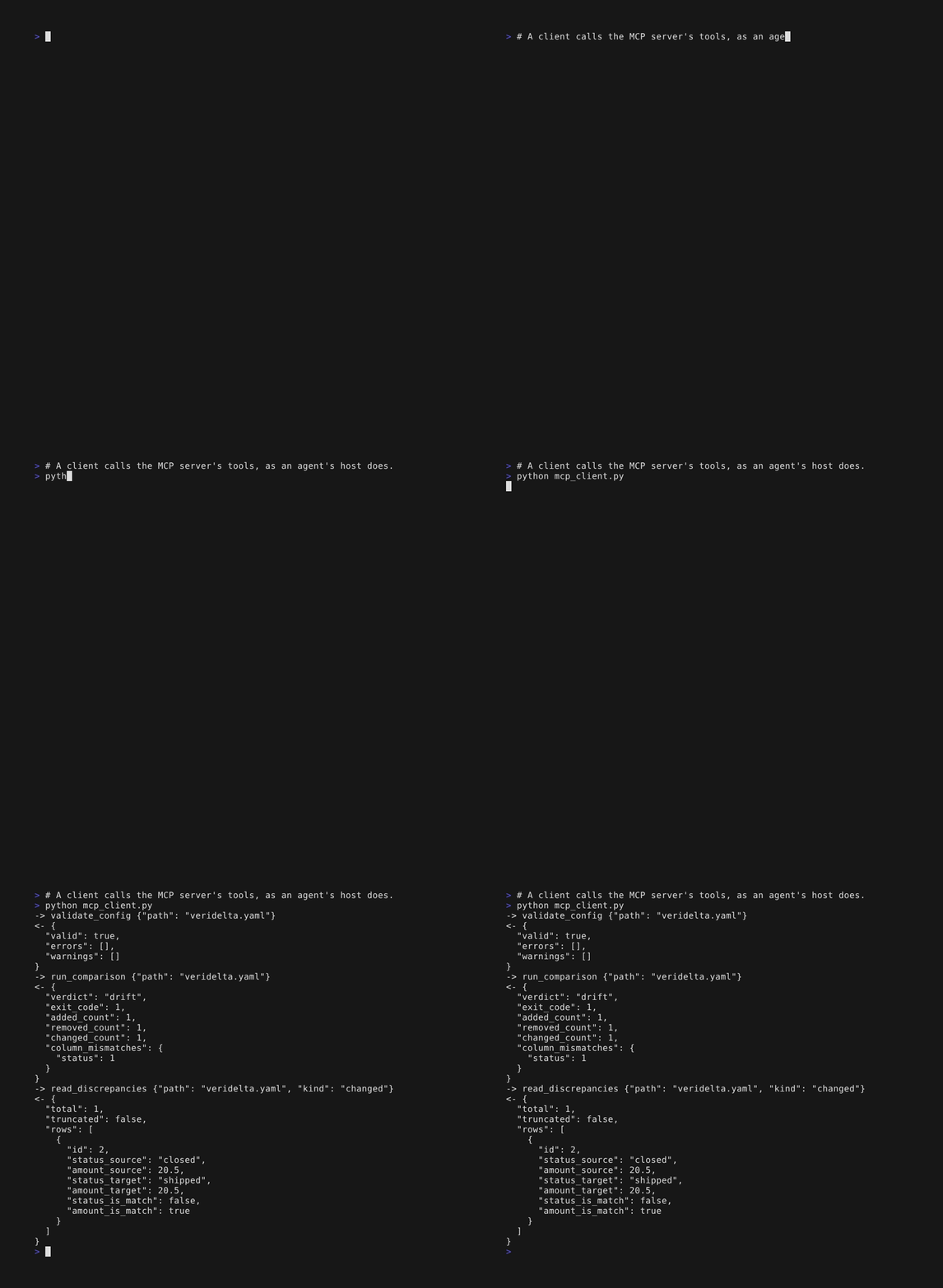
> # A client calls the MCP server's tools, as an agent's host does.
> python mcp_client.py
-> validate_config {"path": "veridelta.yaml"}
<- {
  "valid": true,
  "errors": [],
  "warnings": []
}
-> run_comparison {"path": "veridelta.yaml"}
<- {
  "verdict": "drift",
  "exit_code": 1,
  "added_count": 1,
  "removed_count": 1,
  "changed_count": 1,
  "column_mismatches": {
    "status": 1
  }
}
-> read_discrepancies {"path": "veridelta.yaml", "kind": "changed"}
<- {
  "total": 1,
  "truncated": false,
  "rows": [
    {
      "id": 2,
      "status_source": "closed",
      "amount_source": 20.5,
      "status_target": "shipped",
      "amount_target": 20.5,
      "status_is_match": false,
      "amount_is_match": true
    }
  ]
}
The person who starts the server decides what it may read, and no tool call can change that:
- Each
--rootnames a folder the tools may read configuration files from, and a path outside every root fails the call. The server runs in the first root, so a relative path resolves there. - A tool that opens a side reads files on this machine only from under the roots,
~and links included, since a column name or an error can carry a file's text as a row does. Data elsewhere, such as an object store or a warehouse, is read as the command line reads it. - A run writes the rows that differ to the configuration's
output_path, sorun_comparisonandread_discrepanciesrefuse one outside every root before they read a row. - A side's
queryruns as written, with the configuration's credentials, so a tool that would run one refuses unless the server is started with--allow-queries. Even then, a DuckDB file's connection reads other files, attaches databases, and loads extensions only from under the roots. A MotherDuck connection is not held to the roots. - A tool returns findings, counts, and column names, never the configuration or a value from the data, unless the server is started with
--allow-row-values. A password inside an error is masked, as on the command line, and so is every value of four characters or more that the configuration takes from an environment variable, wherever it appears in an answer. - With
--allow-row-values,read_discrepanciesreturns at most--max-rowsrows per call, 50 by default.propose_value_mapsreturns at most that many value map entries, counting the entries a column's rule already has, and a proposal comes back whole or not at all.suggest_rulesreturns at most that many example keys, and a suggestion comes back whole or not at all. - With
schemas, a check reads each side's columns asveridelta validate --schemasdoes, and without it a check opens no data.describe_schemareads one side's columns the same way, and a warehouse table with the probe a run starts with. - A host may start the server with only some of the user's environment variables. A
${NAME}that the configuration references must reach the server, through the host'senvsetting for it if need be, or the check reports it unset.allow_missing_envchecks a file without them.
A call that fails returns its error's type and message, as run --json prints them, such as ConfigError for a path outside the roots. Serving tools to an agent lists the command's flags.
Where row values appear
The summary holds counts and column names only. These outputs hold values from the data:
- the discrepancy files a run writes to
output_path; - the HTML report;
- a Markdown summary with
--markdown-max-rowsabove zero; - the proposals
veridelta crosswalkprints; - what
read_discrepancies,propose_value_maps, andsuggest_rulesreturn, on an MCP server started with--allow-row-values.
A pair compared in place, such as two warehouse tables, brings back counts and primary keys only, unless it fetches a row sample.
Writing a configuration
veridelta schema prints the JSON Schema of the configuration file. Check a draft against it, then run veridelta validate.
Checking the output
veridelta schema run prints the JSON Schema of what veridelta run --json prints, and validate, crosswalk, suggest, baseline, and error name the others. The docs site serves the same files; see Printing the schema. A script or an agent can check what it parses against them.
On a pull request, the comment the GitHub Action keeps ends with the run's summary as JSON, in an HTML comment that readers never see. It holds counts and the column names the comment shows, never a value, and Markdown summary shows how to parse it.
Fixing drift in a loop
An agent that changes a pipeline can check its own work against the data the pipeline produced before, and keep fixing until the two match:
- Change the pipeline. Push the change to the pull request, or run the pipeline locally.
- Let the comparison run: the GitHub Action on the pull request, or
veridelta run --jsonlocally. - Read the result and its exit code. On the pull request, parse the JSON at the end of the Action's comment, as Markdown summary shows. Locally, read what
run --jsonprints. Both holdadded_count,removed_count, andchanged_count.column_mismatchesholds every drifting column inrun --json, and in the comment the ones its table lists. - Find the cause in the change, not in the data. The columns that drift, and how many rows each one changes, point to the code that writes them. With the MCP server started with
--allow-row-values,read_discrepanciesreturns the rows that differ. - Fix the change, and go back to step 1.
Stop when the run matches, and report the counts. Stop too when the drift that remains is what the user asked for, such as a new rounding, and say which columns it is in. Never add a rule, or raise threshold, to make a run pass unless the user agrees: a rule changes what counts as a match, for every later run too. When the user accepts the drift that remains, veridelta run --save-baseline accepted.json records it, and later runs pass --baseline accepted.json, so they fail only on new drift; see Accepting drift.
Docs for language models
The site publishes two plain-text files for language models, as the llms.txt proposal describes:
llms.txtlinks every page, each with its opening sentence.llms-full.txtholds every page of prose in one file, this one included.
Agent skill
The steps above are also an agent skill, in skills/veridelta/SKILL.md. An agent that follows the Agent Skills standard loads it from a skills folder in the project. This installs it where Claude Code reads skills; for another agent, use the folder its documentation names:
mkdir -p .claude/skills/veridelta
curl -fsSL -o .claude/skills/veridelta/SKILL.md https://raw.githubusercontent.com/Veridelta/veridelta/main/skills/veridelta/SKILL.md
To pin the skill to a release, put the release's tag in place of main.